Best Mouse P.I. For Hire graphics settings for no lags and max FPS

Mouse P.I. For Hire is out on PC and consoles, and it's off to a good start as far as Steam numbers are concerned. The game's performance in the early hours has been pretty smooth, but if you're on PC, you can improve it further by tweaking the in-game settings.
Best Mouse P.I. For Hire graphics
Before I deep dive into the settings, here's my current setup.
- NVIDIA RTX 3060 12 GB
- RAM DDR5 16 GB
- AMD Ryzen 5600G
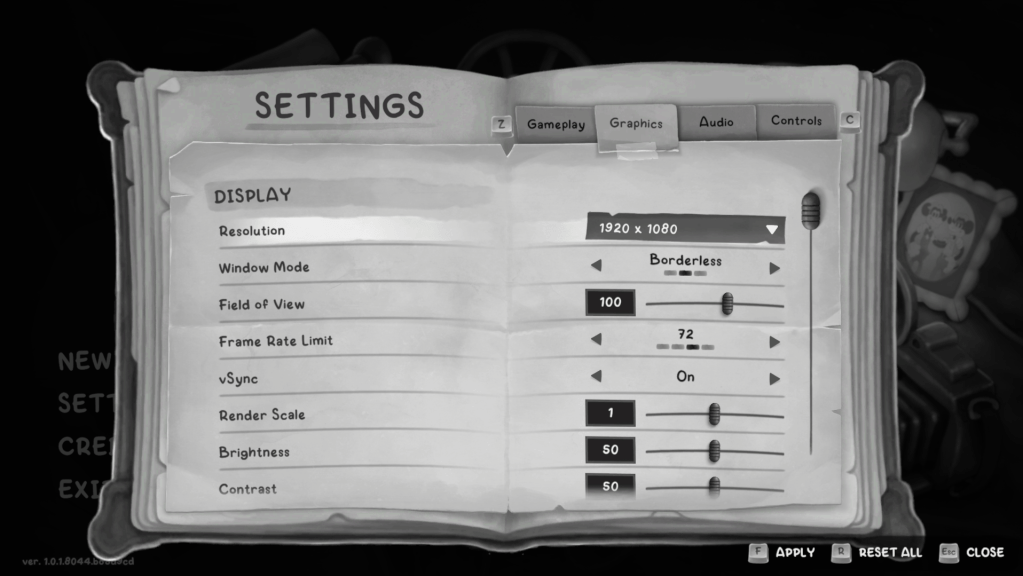
Here are the current settings I am using on my system.
- Resolution: 1920x1080 (personal preference)
- Window Mode: Personal preference
- Field of View: 100
- Frame Rate Limit: 72
- VSync: Off
- Render Scale: 1
- Anti-aliasing: DLSS4
- DLSS4: Balanced
- Graphics Preset: Custom
- Volumetric Lights Quality: Medium
- HLOD: Low
- Effects Quality: Medium
- Texture Quality: Medium
- Shadow Quality: Low
- Rim Lights: Off
- Anisotropic Filtering: Low
- Ambient Occlusion: SSAO
- Depth of Field: On
- Film Grain Effect: You can keep this on. I put it to 0 because I didn't like it.
- Diffusion: 0
Here are some brief explanations about the choices I have made.
- Mouse P.I. For Hire is a single-player experience, and 72 FPS is ideal. You can externally lock it to 60 FPS if you want, but there won't be a huge difference. If you want, you can reduce it to 36 FPS (for lower-end devices) or increase it to 144. I didn't find an option to take it past 144 FPS, incidentally (if you're on one of those hyper-powered GPUs).
- Just like I do with all games, I went with VSync turned off. It didn't offer me anything extra, and having it turned off reduces the load on my system.
- Since I encountered a few stutters when playing in High, I went for custom instead. Some of the features that require more resources have been kept low, while the rest are on Medium. You can switch them as per your preferences and the capabilities of your systems.
The post Best Mouse P.I. For Hire graphics settings for no lags and max FPS appeared first on Destructoid.
Stay tuned thanks for visiting


Comments
Post a Comment